Why Does Toner Cartridge Have a Chip? Explained
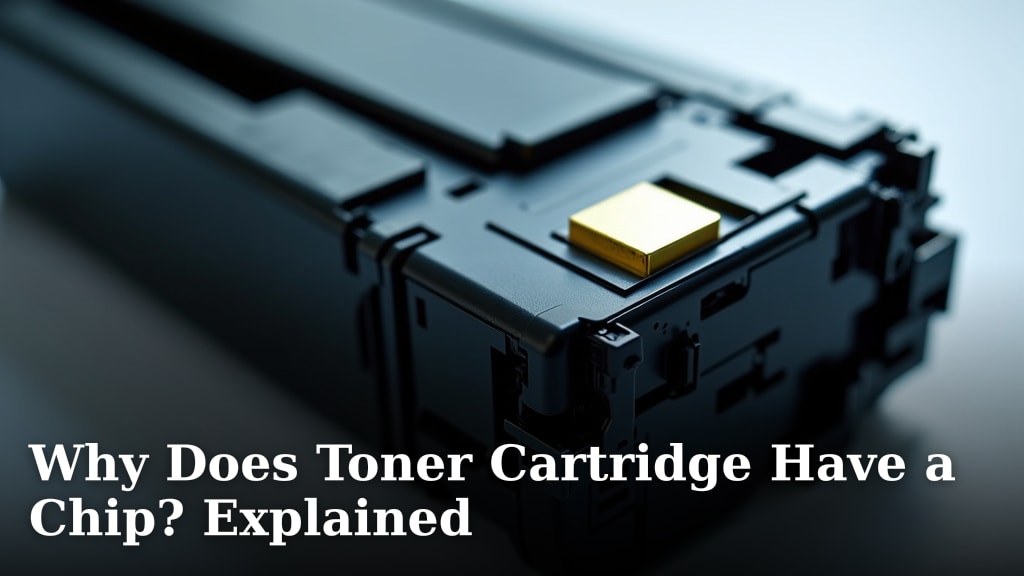
Your printer’s toner cartridge has a chip because it’s the smart little brain that helps your printer work correctly. This chip tells your printer important information, like the ink or toner level and whether the cartridge is genuine. It’s essential for proper printing and preventing errors.
Think of it like a security tag and a gauge all in one. Without this chip, your printer wouldn’t know when it’s low on toner. It also helps ensure you’re using compatible cartridges, which can affect print quality and avoid potential damage to your machine.
- Toner chips communicate with your printer.
- They track toner levels to let you know when to replace it.
- Chips also help verify that you’re using the right kind of cartridge.
- This prevents errors and ensures optimal print performance.
Let’s take a closer look at why that small chip is so important for your printing needs.
Understanding Your Toner Cartridge’s Smart Chip
You might be wondering why that little chip on your toner cartridge is there. It’s not just for show! This chip is a tiny computer that talks to your printer. It plays a big role in how your printer functions. Let’s break down what this chip actually does for you.
What the Toner Chip Does: The Core Functions
At its heart, the chip’s main job is to communicate vital information between the toner cartridge and your printer. It’s like a translator. Without it, your printer wouldn’t understand what’s happening inside the cartridge. This communication is key for smooth operation. We found that modern printers rely heavily on this exchange of data.
Tracking Toner Levels Accurately
One of the most important jobs of the chip is to monitor the toner level. It knows how much toner is left. Your printer uses this information to show you a toner low warning. This helps you avoid running out of toner mid-print. Imagine finishing a really important document, only to have it stop halfway. That’s what the chip helps prevent!
Ensuring Cartridge Compatibility
The chip also verifies that the cartridge is the correct type for your specific printer model. Printers are designed to work with certain cartridges. Using the wrong one can cause problems. This could range from poor print quality to actual damage to your printer. The chip acts as a compatibility check, preventing potential issues.
Preventing Printer Errors and Malfunctions
When the chip reports that the toner is low or if it detects an issue with the cartridge, your printer can respond. It might display an error message. This helps you troubleshoot. You know exactly what the problem is. This avoids confusing error codes or unexpected shutdowns. It streamlines the entire printing process.
Why Manufacturers Use Toner Chips
Printer manufacturers include these chips for several reasons. They want to ensure you have the best possible printing experience. They also have business reasons for this technology. Understanding these motivations can help you make informed choices about your printing supplies.
Maintaining Print Quality Standards
High-quality toner is essential for sharp, clear prints. Manufacturers design their printers and toner cartridges to work together. The chip ensures that a genuine or compatible cartridge is being used. This helps maintain the expected print quality. Off-brand cartridges might not perform as well. This can lead to faded text or blurry images. Many consumer reports highlight print quality differences.
Protecting Your Printer’s Longevity
Using the correct toner can protect your printer’s internal components. Some non-genuine toners might contain particles that are too large or too small. These can cause wear and tear. The chip helps ensure you’re using a cartridge that meets the manufacturer’s specifications. This can contribute to the long-term health of your printer. Some service technicians report more issues with printers using incompatible supplies.
Enabling Smart Features and Tracking
Beyond basic functions, chips enable other smart features. They can track page counts. This is useful for businesses with managed print services. The chip can also report on the cartridge’s manufacturing date or batch number. This data can be used for quality control. It helps manufacturers identify any potential problems with a specific production run.
The Role of Chips in Third-Party and Refilled Cartridges
The presence of chips on toner cartridges has a significant impact on the use of third-party and refilled options. It’s an area where users often encounter challenges. Here’s what you should know.
Chip Resetting and Replacement
When you refill a toner cartridge or use a compatible one, the chip often needs attention. Sometimes, the original chip will report as “empty” even after refilling. You might need to reset the old chip or replace it with a new one. Many companies that refill cartridges offer this service. They use specialized tools to reset the chip’s counter.
Potential Compatibility Issues with Non-Genuine Chips
Not all third-party chips are created equal. Sometimes, a compatible cartridge might come with a chip that isn’t fully recognized by your printer. This can lead to error messages or the printer refusing to print altogether. It’s important to buy from reputable suppliers who guarantee compatibility. We found that good reviews often mention successful chip recognition.
How Printers React to Non-Genuine Chips
Some printer manufacturers actively try to prevent the use of non-genuine cartridges. They may design their printers to reject cartridges with unrecognized chips. This is often done through firmware updates. These updates can make older third-party chips incompatible. It’s a constant cat-and-mouse game in the printer supply industry. For example, some users have reported that a printer firmware update caused their previously working compatible cartridges to stop functioning.
Making Smart Choices About Your Toner Cartridges
Knowing why toner cartridges have chips can help you make better decisions. You can save money and ensure your printer runs smoothly. Think of it as getting to know your printer’s inner workings.
Here’s a quick checklist to keep in mind:
- Always check if a cartridge is compatible with your printer model.
- Buy from reputable suppliers that offer guarantees.
- Understand that refilled cartridges might need chip service.
- Be aware that firmware updates can sometimes affect third-party chips.
- Consider the long-term cost versus potential print quality issues.
- If unsure, stick to genuine cartridges for guaranteed performance.
The chip is a small component, but it has a big impact. Understanding its role empowers you to manage your printer more effectively. It helps you avoid unnecessary frustration and keep your documents printing without a hitch.
Conclusion
You’ve learned that your toner cartridge chip is much more than just a small piece of plastic. It’s your printer’s communication link, ensuring accurate toner levels and proper cartridge compatibility. This chip helps prevent errors, maintain print quality, and protect your printer’s lifespan. By understanding its role, you can make smarter choices about your printer supplies. Your next step is to check your printer manual or the cartridge packaging for compatibility. This ensures you purchase the right toner and avoid potential issues. Keeping this small component in mind will help your printer run smoothly for longer.
Frequently Asked Questions
Will my printer stop working if the toner chip is faulty?
Yes, a faulty or unrecognized toner chip can prevent your printer from working. The chip communicates essential information to the printer. If this communication fails, the printer may display an error message and refuse to print. Always ensure you are using a compatible cartridge with a functioning chip.
Can I ignore the “low toner” warning from the chip?
You can choose to ignore the warning, but it’s not recommended. The chip’s low toner alert helps you avoid running out of toner mid-print. Continuing to print with very low toner can sometimes lead to poor print quality or even damage to your printer’s drum. It’s best to have a replacement cartridge ready.
What happens if I update my printer’s firmware?
Firmware updates can sometimes affect how your printer recognizes third-party toner chips. Manufacturers occasionally update firmware to improve performance or security. These updates might make older compatible chips incompatible. If you use non-genuine cartridges, research if firmware updates are known to cause issues.
How can I tell if a third-party toner chip is compatible?
Reputable third-party toner suppliers will clearly state which printer models their cartridges are compatible with. Look for guarantees of compatibility on their product pages or packaging. Reading customer reviews can also offer insight into whether the chip is recognized by the printer without errors.
Do refilled toner cartridges always have new chips?
Not always. When a toner cartridge is refilled, the original chip might be reset to indicate a full level. Sometimes, a new compatible chip is installed. The method used can vary by the refilling service. Always confirm with the provider what chip service is included with their refilled cartridges.